Weather watch face W5.5
FutorumWeather
4.127.00 Reviews
- Version
- 1.0.2
- Installs
- 10.00K
- Age Rating
- Everyone
Screenshots
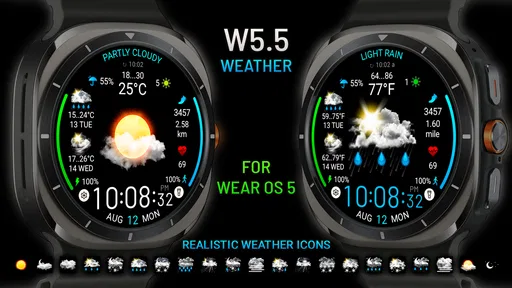
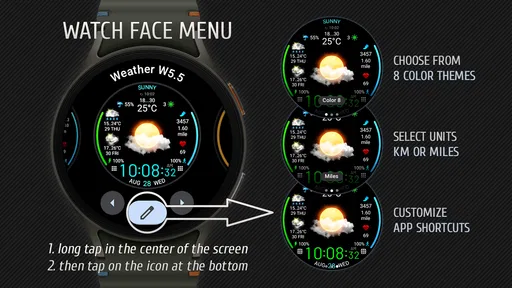
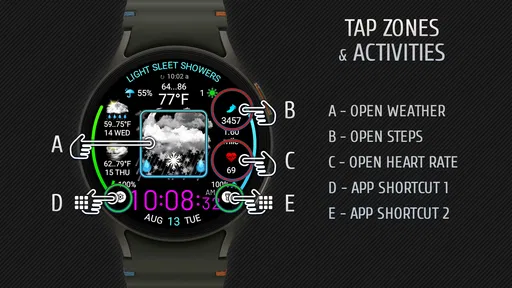
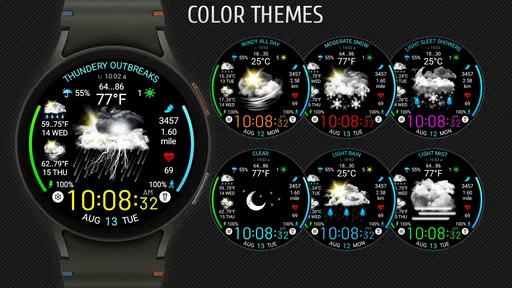
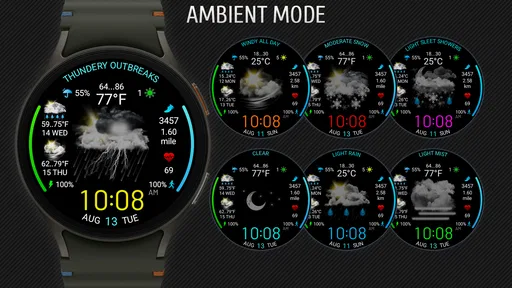
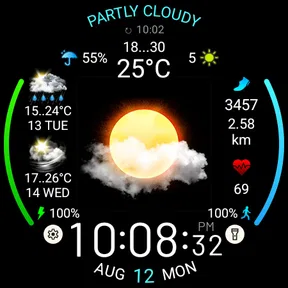
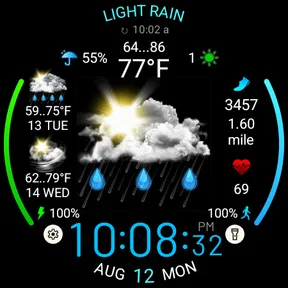
Our Review of Weather watch face W5.5
 Analysis by Appyee
I find a weather watch face most useful when I can check it with a quick glance, without pulling out my phone or opening a full forecast app. That’s the idea behind Weather Watch Face W5.5, a paid weather app from Futorum for Wear OS 5 and later. It’s aimed at people who want weather information on their watch face, rather than another phone-style app to browse. For me, the main question is whether that glance-first approach fits the way you actually use a smartwatch—and whether the information is comfortable to read in the situations that matter.
Weather that works at a glance
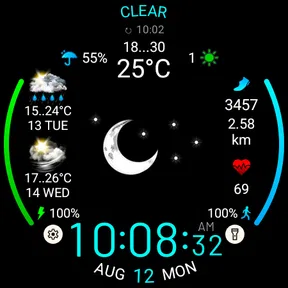
A watch face has limited space, so readability depends on more than how much information it can show. The useful test is whether you can pick out what matters while standing at a bus stop, walking outside, or getting ready to leave. W5.5 centers weather details on the watch face, which makes it a different kind of tool from a conventional weather app: you’re checking conditions in passing, not settling in to explore a map or scroll through a long forecast.
The app’s version 1.0.2 is listed for Everyone, and its $2.99 price makes it a deliberate purchase rather than a free extra to try casually. It has a 4.1 average from around 350 ratings, with more than 10,000 installs. Those figures suggest an established audience, but they can’t tell you whether the face will suit your eyesight, preferred layout, or particular watch. I’d judge it by how quickly you can read the details you care about on your own screen.
Readability and navigation on a small screen
When I first installed the Weather Watch Face W5.5, I was immediately struck by its sleek and clean design. It's not just about looking good, though—it’s about functionality. The interface is straightforward, making it easy even for the least tech-savvy among us to navigate. The weather details are front and center, which is exactly what you want from a weather app.
That glanceable layout is a practical advantage if your usual routine involves repeated, very short checks. You can make a quick decision—take a jacket, wait before heading out, or check the sky again later—without getting drawn into your phone. It also changes how I think about the watch face: the best arrangement is not necessarily the one showing the most data, but the one that makes your most frequently needed detail easiest to notice.
Motor and sensory considerations
A watch-face check can be easier than using a phone for someone who prefers not to reach into a pocket or perform a longer sequence of taps. That doesn’t automatically make every watch face accessible, though. Screen size, text contrast, display brightness, and the wearer’s ability to interact with the watch all shape the experience. I’d spend a moment checking the face in the lighting where you normally wear your watch, rather than assuming it will be equally legible indoors and outdoors.
Weather information can also be useful without sound: a visual glance is a quiet way to check conditions in a meeting, a library, or a noisy place. But a wrist display is not a substitute for a detailed alert you can reliably notice, and anyone who depends on larger text or spoken information should consider whether a compact face gives them enough. The choice is personal; a phone forecast may be more comfortable when you need to read carefully.
Features Worth Noting
One of the standout features is the real-time weather updates. You’re getting the most up-to-date information, which is crucial for planning your day. Whether it's a sunny morning or a stormy afternoon, the app keeps you in the loop.
Another thing I love is the customizable watch face. It’s not just about the weather; you can tweak the look to match your style. From color choices to different data displays, it gives you a bit of creativity to personalize your experience.
The app also offers a 7-day forecast, which is perfect if you’re planning a trip or just want to know what to expect for the week. Plus, the hourly updates give you a detailed outlook, so you're never caught off guard.
Those layers serve different purposes: a quick current check helps with an immediate decision, while a broader outlook is more useful when you’re planning ahead. I’d use the watch face for the first and treat the longer view as a prompt to check details before a trip, rather than expecting a small display to answer every planning question. That division of labor is one of the clearest reasons to pair a watch face with a full weather app instead of expecting either one to do everything.
Situational access in an ordinary day
Picture leaving home on a changeable morning. You glance at your wrist before walking to the station, then check again when you’re deciding whether to take a longer route after work. A weather face can make those small checks convenient because the information is already on the screen you wear. It may be especially appealing to people who are outdoors on and off during the day, or who want weather to be part of their regular watch glance rather than a separate phone habit.
For a longer outing, I would use the face as a quick reference, then consult a phone forecast before committing to plans. A watch is handy when your hands are occupied, but the smaller display is less suited to comparing several hours or thinking through a trip in detail. If you’re planning a walk with someone who has different needs or a tight schedule, it’s worth checking the forecast together on a larger screen instead of relying on a glance at one wrist.
Getting into the Details
Let’s dive deeper into what makes this app tick. The integration with your smartwatch is seamless. It syncs quickly, and the battery drain is minimal, which is a big plus because no one wants their watch dying halfway through the day.
The app uses GPS to provide location-specific forecasts. This means you're getting the precise weather conditions for your exact location, not just a general area forecast. It’s this attention to detail that really sets it apart.
It's also worth mentioning the weather alerts. These are super handy for those unexpected weather changes. The app sends notifications directly to your wrist, so you’re always informed, even if you don’t have your phone handy.
Location is a useful part of the experience, but it’s also a detail worth thinking through before making a purchase. If your day involves moving between home, work, and other places, location-specific information can better match where you are than a forecast fixed to one point. If you mostly stay in one place, a manually selected location in a regular weather app may be enough. In either case, I’d check that the displayed location makes sense after you set up the face, especially before depending on it for a change in plans.
Wear OS 5 or later is an important practical requirement: this is not a general phone weather app that happens to offer a watch companion. If your watch runs an earlier system, or you don’t use a compatible Wear OS watch, this particular option won’t fit your setup. Before paying, I’d check the watch’s system version and confirm that you want a watch face rather than a standalone forecast app. That quick compatibility check is more useful than choosing by appearance alone.
Where it fits—and where it doesn’t
Compared with the usual weather-app routine, W5.5 puts information directly on the watch face instead of asking you to open an app on your phone. That is a meaningful convenience for frequent glances, but it is not automatically better for every task. Phone apps usually give you more room to read and explore a forecast; a watch face favors speed and a compact view. I’d choose W5.5 for convenient wrist checks, and keep a full weather app available when I need more context.
There are a few useful habits that make this kind of setup work better. First, personalize the face around the information you genuinely check, rather than changing options just to fill the display. Second, make a habit of checking the forecast on your phone before plans where a poor decision would matter; a glance is helpful, but it is not the same as reviewing conditions in detail. Third, test the display while moving and in your usual outdoor light. A face that looks clear when you configure it may be less comfortable to read in a quick glance outside.
The trade-off is straightforward: W5.5 asks you to value convenience on your wrist enough to pay for it and use a compatible watch. Someone who rarely checks weather, prefers large text, or wants maps and an expansive forecast may be happier with a phone app. I’d also skip it if you expect a weather face to remove the need to check changing conditions more carefully. A compact view can support a decision; it can’t make every weather decision for you.
Living with the App
After using the app for a while, I can confidently say it makes life a whole lot easier. Whether I'm heading out for a run or planning a weekend getaway, knowing the weather in advance is incredibly helpful. It’s like having a little bit of peace of mind that you’re prepared for whatever Mother Nature throws your way.
Of course, no app is perfect, but the minor tweaks I'd suggest are more about personal preference than functionality. Maybe a few more theme options or additional widgets, but honestly, it's pretty spot on as it is.
That personal-preference caveat matters more on a watch than on a phone, because the face is something you see repeatedly throughout the day. If the arrangement doesn’t feel comfortable after a few days, customization may help, but it won’t turn a compact screen into a large one. I’d give myself time to settle on a layout, then ask whether I’m genuinely using the glance or still reaching for my phone every time. That’s a simple way to tell whether the format is helping your routine.
For someone who values visual access but has difficulty making small wrist details out, the answer may be mixed: having weather close at hand is convenient, while the display itself may still be too compact. I would not buy it on the assumption that customization guarantees an accessible layout for every person. Try to assess the watch’s actual screen and your preferred reading distance first. If you need to zoom, read long descriptions, or compare several locations, a phone remains the more comfortable tool.
A considered choice for the right wrist
In conclusion, the Weather Watch Face W5.5 is a solid choice if you want a reliable weather companion on your wrist. It’s user-friendly, informative, and stylish—everything you’d want in a weather app and more. If you're someone who likes being prepared, this app is definitely worth checking out. You can grab it from the Play Store or App Store and see for yourself how it transforms your daily routine.
So, are you ready to never get caught in the rain again? I know I am!
My recommendation is strongest for Wear OS 5+ owners who already check their watch often and want weather to be part of that habit. It is less compelling for someone who wants a detailed, phone-first forecast, needs a larger reading surface, or does not want to pay for a watch-face experience. At $2.99, the decision comes down to whether that quick access is useful enough in your own day. I’d treat it as a focused wrist companion, not a replacement for every way of checking the weather.
On balance, I like the practical idea of keeping weather visible where I naturally look, while staying realistic about the limits of a small display. The app’s broad appeal is reflected in its Everyone age rating, but an age label doesn’t tell you whether the visual layout works for your abilities or context. If you can comfortably read the face and own a compatible watch, W5.5 is worth considering; if not, a phone-based forecast or another display better suited to you is the more sensible choice.
Verdict
Strengths of Weather watch face W5.5
- Highly customizable watch face options.
- Real-time weather updates.
- Supports multiple weather providers.
- Easy to navigate and use interface.
- Battery-efficient design.
Limitations of Weather watch face W5.5
- Limited free features available.
- Frequent ads in the free version.
- Some data inaccuracies reported.
- Requires constant internet connection.
- Limited support for older devices.
Other Releases by Futorum
View All
Weather watch face W6.5
Weather4.3
Similar Picks in This Category
View All
Weather - By Xiaomi
Xiaomi Inc.4.1

Weather & Radar Forecast
WetterOnline4.8

Weather
OneLouder Apps4.6

AccuWeather: Weather Radar
AccuWeather3.6

The Weather Channel - Radar
The Weather Channel4.6

1Weather Forecasts & Radar
OneLouder Apps4.3
Frequently Asked Questions
What features does the Weather Watch Face W5.5 offer?
The Weather Watch Face W5.5 provides real-time weather updates, including temperature, humidity, wind speed, and atmospheric pressure. It also offers customizable widgets for different weather metrics, a sleek, user-friendly interface, and compatibility with various smartwatch brands. Users can personalize the watch face with different themes and colors to match their style.
Is Weather Watch Face W5.5 compatible with all smartwatches?
Weather Watch Face W5.5 is designed to be compatible with a wide range of smartwatches that use Android Wear OS or are iOS-enabled. However, it’s important to check the specific compatibility details on the app's download page to ensure it works seamlessly with your particular device model and operating system version.
Does Weather Watch Face W5.5 require a constant internet connection?
While Weather Watch Face W5.5 does require internet connectivity to fetch the latest weather updates, it can store recent data temporarily. This allows users to view weather information even when offline. However, for the most accurate and up-to-date information, a regular internet connection is recommended.
How customizable is the Weather Watch Face W5.5?
The Weather Watch Face W5.5 is highly customizable, allowing users to change the appearance and functionality according to their preferences. You can adjust the widget layout, select different color themes, and choose specific weather metrics to display. This flexibility ensures a personalized experience tailored to individual needs and styles.
Are there any subscription fees for using Weather Watch Face W5.5?
Weather Watch Face W5.5 offers a free version with basic features. However, there might be in-app purchases or a premium version available that provides additional features like advanced customization options, ad-free experience, and priority support. It's advisable to review the pricing details on the app store before downloading.
